Can you still run the computer code you wrote back in the 1990s? How would you go about finding where you saved the code? On a 3.5-inch floppy disk—great! But now, you no longer have a drive to read the files on the disk.
It happens faster than you think. Suddenly, the latest version of Microsoft Word no longer recognizes files created with an earlier version of the same software. It happened a few years ago when I tried to open Word files containing my 1995 doctoral thesis. Not only did Microsoft Word fail to recognize the files, but it even informed me that they were of a type that is blocked in the current version of Word. So, Microsoft Word suspects that there is something dangerous in something it once created itself. I find that somewhat surprising.
We eventually solved the problem using LibreOffice, which handles old Microsoft Word files much more gracefully than Microsoft Word does. I have saved my data in the spreadsheet program Kaleidagraph, for which a version is still available thanks to dedicated enthusiasts. Unfortunately, there is little hope for the graphics in the Canvas format, despite numerous attempts with successor products. The PDF format, which is still readable today, was still in its infancy. It would probably have been better to use a simple PostScript format instead of the proprietary format of software like Canvas.
Perhaps you’re too young to have actually been programming in a programming language back in the 1990s. Which programming language did you use? I programmed in BASIC on an Apple II in the early 1980s and in FORTRAN77 in the mid-1980s. I saved my first FORTRAN77 programs on a 5 1/4-inch floppy disk. Back then, in that course at the University of Karlsruhe, I was part of the first generation that no longer punched punch cards. I actually still have one or two of those floppy disks, but I haven’t had a floppy drive in ages—nor do I have one for my 3.5-inch disks, my Magneto-Optical Disks, or my zip disks. I need to see where my CD/DVD drive is.
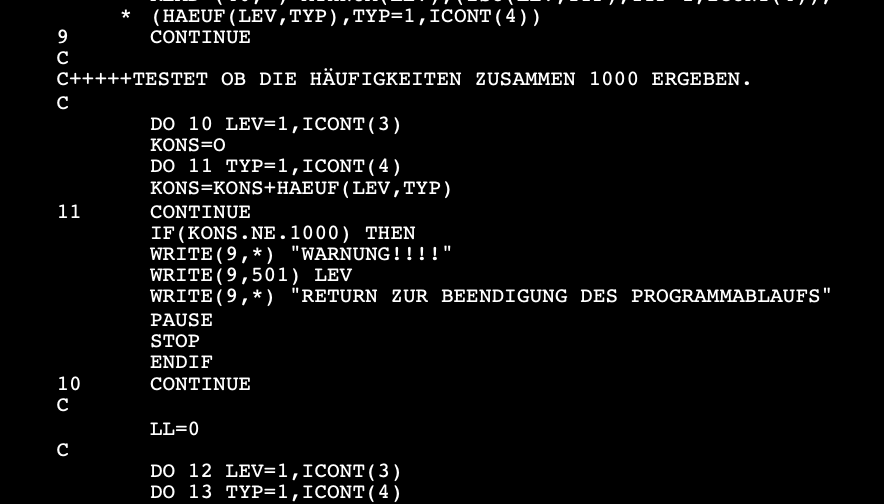
Then, in 1992, I discovered MATLAB, which was invented in the 1970s by the late Cleve Moler. Python was already available back then, but it wasn’t widely known. Version 0.9.0 was released in 1991. Surprisingly, my FORTRAN77 files from the 1980s and early 1990s are still functional, as demonstrated in the image below. Moreover, all my MATLAB .m and .mat files remain readable, even after over 30 years. Regrettably, I no longer possess the 3.5-inch floppy disks containing MATLAB 3.5, as I left them behind in Kiel when I relocated to Potsdam in 1995. However, I still have the floppy disks and manuals for MATLAB 4.2 from that era.
I want to convey a message to those of you who are embarking on your academic careers, as I was in the early 1990s. It’s common to hear or read about individuals who delete all their files upon leaving academia for the private sector, often due to frustration for various reasons. However, it’s more likely that others will build upon their knowledge, particularly during their doctoral studies.
As you progress in your career, you may eventually find yourself in a position where you need to access those old storage devices containing files saved in outdated formats, including computer code written in older programming languages. At that point, you may hope that you can still utilize this valuable information despite the passage of time and the associated nostalgia.
Even if you’re relatively young, you might already have some text and graphics that are a few years old. It’s worth checking if you can still open them and ensure that the output is error-free. Additionally, verify if your computer code still functions correctly, as we frequently hear about changes in function behavior (e.g., the uint8 type in NumPy) or the complete removal of functions (e.g., the clear function in Julia and the hdftool function in MATLAB).
Here’s what you can do right now: Choose storage media and file formats carefully. Opt for simple file formats like ASCII or UTF-8 over more complex ones, especially for your valuable data, computer code, and thesis text. If that doesn’t work, contact the manufacturer’s support team as soon as possible, preferably today rather than tomorrow, if they have one.
Open your files regularly and save a copy in the current format on a new storage device. However, also keep the old ones. When you publish your first papers, you will almost always include data and code, either on the journal’s website or on a recognized and sustainably funded repository like Cern’s ZENODO or GitHub. This is in the hope that they will remain available indefinitely.
AI Statement
The text was written by M.H. Trauth but was edited for language, spelling, and grammar using Apple Intelligence. The illustrative image was created using ChatGPT on 7 May 2026.
References
Trauth, M.H., Sillmann, E. (2026) Collecting, Processing and Presenting Geoscientific Information with Python – First Edition. Springer International Publishing, in press.
Trauth, M.H., Sillmann, E. (2026) Collecting, Processing and Presenting Geoscientific Information with MATLAB® – Third Edition. Springer International Publishing, in press.